
Description
GOALS Companion App – Manage Your Football Squad Anytime, Anywhere
Take control of your football club with the GOALS Companion App. Manage your squad on the go, open Player Packs, organize your player inventory, and adjust your formations from anywhere. Whether you’re building your dream team or fine-tuning your lineup, the GOALS Companion App helps you prepare your club for your next match.Key Features
- Open Player Packs: Unlock new players and expand your squad.
- Manage Your Squad: View your player inventory and organize your team.
- Customize Formations: Adjust your lineup to suit your preferred strategy.
- Manage Your Club Anywhere: Access squad management features while on the go.
Experience the Full GOALS Football Game
The GOALS Companion App is designed to complement the full GOALS football video game, not replace it. The main game is a free-to-play football experience available on PC, with PlayStation and Xbox support planned according to the provided product information. Enjoy responsive football gameplay, compete in 1v1 matches, team up for 5v5 matches, train your players, customize your squad, and climb the competitive leaderboards. Build your club, develop your strategy, and compete with friends across supported platforms. Important: This is a companion app for squad management and Player Packs. It is not the full GOALS football video game.How to Purchase Goals on MooGold:
- Select your preferred Coins denomination.
- Enter your Game User ID.
- Proceed to checkout and select your payment method.
- Once payment is made, the Coins will be credited to your account shortly.
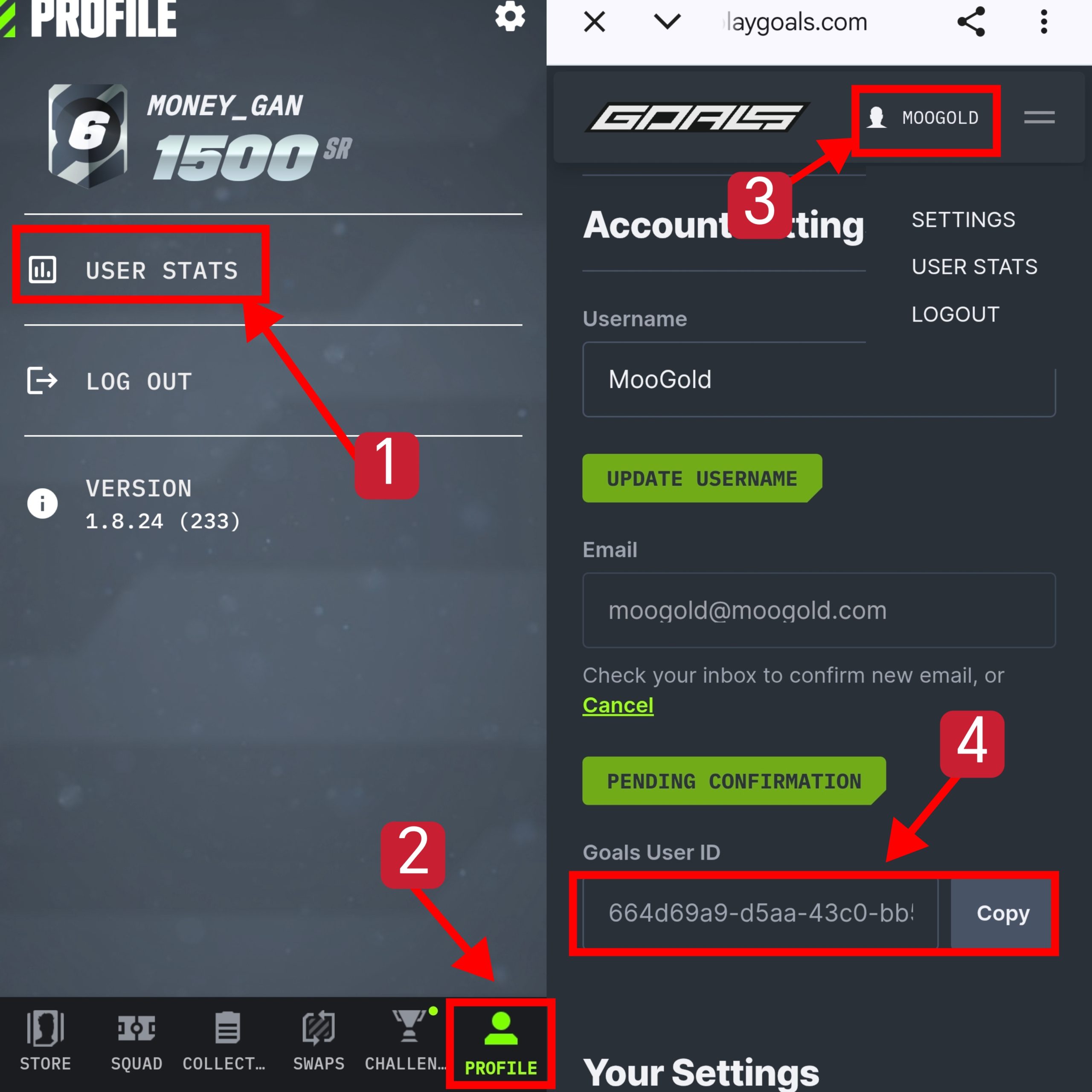
How to Find Your Game User ID
- Open the GOALS Companion App and tap PROFILE at the bottom-right corner.
- Select USER STATS in your profile menu.
- Tap your username at the top-right corner of the GOALS website, then open your account settings.
- Scroll down to Goals User ID and tap Copy next to the ID.
Here are the steps to make a purchase using MooGold:
- Sign In or Register: First, log in to your MooGold account. If you don’t have one, you can easily create a new account at MooGold.com/account.
- Browse the Shop: Next, visit the Shop page to explore your desired category or game. Alternatively, you can use the search bar to quickly find specific items.
- Select Your Product: Then, choose the product you want, select the desired quantity, and click “Add to Cart”.
- Checkout: After adding items to your cart, proceed to checkout. Here, select your preferred payment method and complete your payment.
- Receive Your Item: Once your payment is confirmed, your order will be delivered. You can track it anytime under My Account → Orders.
Why Buy from MooGold?
- Trusted & Authorized
MooGold is a reliable and authorized reseller, committed to providing a seamless and secure top-up experience. - Wide Selection of Denominations
Whether you’re a casual player or a seasoned adventurer, we offer a variety of top-up amounts to suit your gaming needs. - Multiple Payment Methods
Choose from a range of safe and convenient payment options for a smooth, hassle-free purchase. - Fast & Reliable Delivery
Once your order is confirmed, our team ensures a quick and dependable top-up so you can get back to your game without delay. - 24/7 Customer Support
Have questions or need assistance? Our friendly support team is available around the clock to help with any inquiries or issues.