

Description
🎤 WeSing
WeSing is a popular karaoke app that lets you sing your favorite songs, record high-quality karaoke videos, and connect with music lovers around the world. Whether you’re a seasoned performer or just singing for fun, WeSing gives you the stage to shine.
With millions of songs and a global community, you can sing solo, duet with friends or artists, or join exciting karaoke party rooms. Voice effects and video filters let you make every performance stand out.
Join music challenges, share your performances, gain followers, and showcase your singing talent to the world. 🌟
🎵 Key Features
Extensive Song Library
- 🎶 Sing the latest hits and classic favorites
- 🔎 Browse by genre, artist, or popularity
- 🔥 Regularly updated with trending songs
🎙️ Record & Edit Like a Pro
- 🎚️ Add voice effects, pitch correction, and filters
- 🎧 Get real-time feedback while singing
- 📹 Record full songs or your favorite sections
👫 Duet with Artists & Friends
- 🎤 Sing with your favorite artists or friends
- 🌎 Duet with others no matter the distance
📱 Create & Share
- 💿 Organize recordings into personal albums
- 📤 Share your performances across social platforms
- ❤️ Discover new singers and connect with music lovers
🎁 Send Gifts & Build Your Community
- 🎁 Support singers with virtual gifts
- 💬 Like, comment, and interact with friends and fans
✨ Smart Features
- 📥 Download songs for offline singing
- 🎯 Get personalized song recommendations based on your preferences
🎤 Sing. Share. Connect. Let your voice be heard with WeSing!
How to Purchase WeSing Kcoin on MooGold
- Select the Kcoin denomination you wish to purchase.
- Enter your WeSing Player ID.
- Review your order and select your preferred payment method.
- Complete the payment. Your purchased Kcoin will be credited to your account shortly.
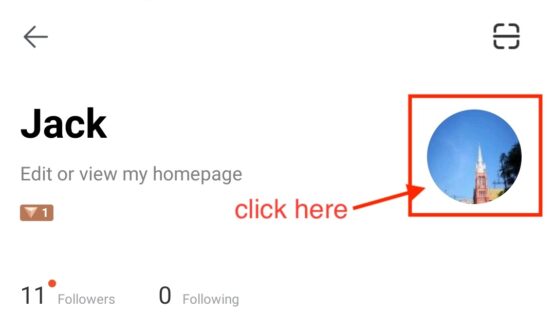
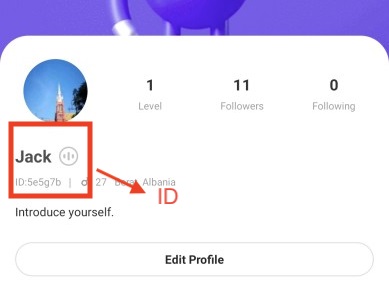
How to Find Your WeSing ID
- Log in to your account on the WeSing App.
- Tap the Profile icon in the upper-right corner of the home screen.
- Tap the Profile icon again to open your full profile.
- Your WeSing ID will be displayed below your nickname.
Here are the steps to make a purchase using MooGold:
- Sign In or Register: First, log in to your MooGold account. If you don’t have one, you can easily create a new account at MooGold.com/account.
- Browse the Shop: Next, visit the Shop page to explore your desired category or game. Alternatively, you can use the search bar to quickly find specific items.
- Select Your Product: Then, choose the product you want, select the desired quantity, and click “Add to Cart”.
- Checkout: After adding items to your cart, proceed to checkout. Here, select your preferred payment method and complete your payment.
- Receive Your Item: Finally, once your payment is successful, contact our live chat team with your order ID to arrange the delivery or listing of your purchased item.
Why Buy from MooGold?
- Trusted & Authorized
MooGold is a reliable and authorized reseller, committed to providing a seamless and secure top-up experience. - Wide Selection of Denominations
Whether you’re a casual player or a seasoned adventurer, we offer a variety of top-up amounts to suit your gaming needs. - Multiple Payment Methods
Choose from a range of safe and convenient payment options for a smooth, hassle-free purchase. - Fast & Reliable Delivery
Once your order is confirmed, our team ensures a quick and dependable top-up so you can get back to your game without delay. - 24/7 Customer Support
Have questions or need assistance? Our friendly support team is available around the clock to help with any inquiries or issues.
Link
- ▶️ YouTube: http://www.youtube.com/c/WeSingApp
- 📘 Facebook: http://www.facebook.com/OfficialWeSing
- 📸 Instagram: http://www.instagram.com/wesingapp/
- 🐦 Twitter: http://www.twitter.com/WesingApp/